localStorage property in JavaScript

Hi I'm Yousra, a clinical pharmacist and a software developer in the making. I'm self-taught, exploring development world with heavy focus on frontend applications.
Introduction:
JavaScript provides a powerful and convenient way to store data on the client side through the use of web storage APIs. Local storage, a key component of web storage, allows developers to store key-value pairs persistently within the user's browser. Let's explore the fundamentals of local storage in JavaScript and discuss a technique known as Object Local Storage for storing complex data structures.
💚What is localStorage in JavaScript?
Local storage is part of the Web Storage API and is widely supported by modern browsers. It provides a simple and efficient way of storing data locally, allowing developers to persist information even when the user closes and reopens the browser. The following are key methods associated with local storage:
Storing Data:
localStorage.setItem('key', 'value');
The setItem method sets a key-value pair in local storage.
Retrieving Data:
const storedValue = localStorage.getItem('key');
console.log(storedValue); // Output: 'value'
The getItem method retrieves the value associated with a specific key from local storage.
Example:
In this simple example, you enter a text in the input field, the text then appears below and is saved to the local storage.
function saveData() {
var inputField = document.getElementById("inputField");
// Storing input value in local storage
  localStorage.setItem("value", inputField.value);
 // Retrieving input value from local storage and Display it below
  document.getElementById("displayText").innerHTML =
   localStorage.getItem("value");
}
//EventListener for the input field
document.getElementById("inputField").addEventListener("input", saveData);
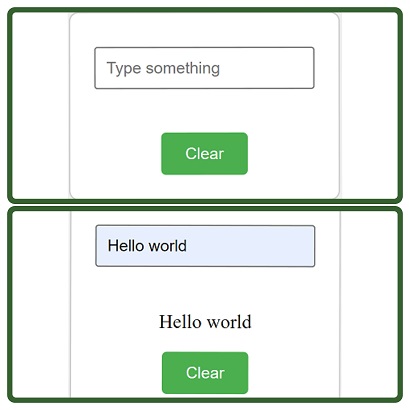
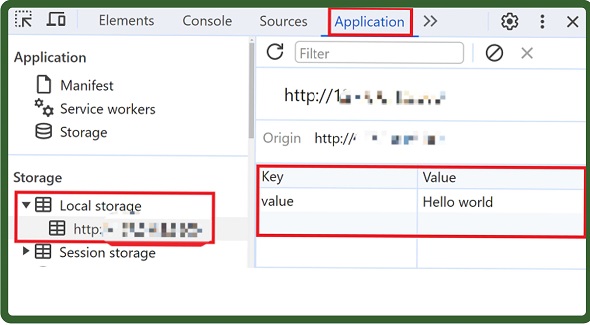
- Go to your Chrome dev tools Application tab, under storage ⏩ Local storage, you will find the text saved.
Removing Data:
localStorage.removeItem('key');
The removeItem method removes a key-value pair from local storage based on the key.
Clearing Local Storage:
localStorage.clear();
The clear method removes all key-value pairs from local storage.
💚Object Local Storage:
While local storage can only store strings, developers often need to store more complex data structures, such as JavaScript objects. Object Local Storage is not a distinct feature but rather a technique that involves converting objects to JSON strings before storage and parsing them back into objects upon retrieval.
Storing Objects:
const userObject = { name: 'John', age: 25 };
localStorage.setItem('user', JSON.stringify(userObject));
Here, the JSON.stringify method converts the object into a JSON string before storing it in local storage.
Retrieving Objects:
const storedObject = JSON.parse(localStorage.getItem('user'));
console.log(storedObject); // Output: { name: 'John', age: 25 }
The JSON.parse method is used to parse the JSON string and convert it back into an object when retrieving it from local storage.
💚Best Practices and Considerations:
Size Limitations: Local storage has size limitations. Avoid storing large amounts of data to prevent performance issues.
Security Concerns: Avoid storing sensitive information like passwords or credit card numbers in local storage, as it is accessible to JavaScript, to keep your users' information safe.
Browser Compatibility: While local storage is supported by modern browsers, always check for compatibility, especially when developing for a wide range of users.
Clearing Unused Data: Regularly clear unused data from local storage to ensure optimal performance and avoid unnecessary storage consumption.
💚Conclusion
Local storage in JS is a handy tool for storing small amounts of data on users' devices. It's easy to use and persists across sessions. Used carefully, local storage enhances web development, providing a simple solution for client-side data storage.